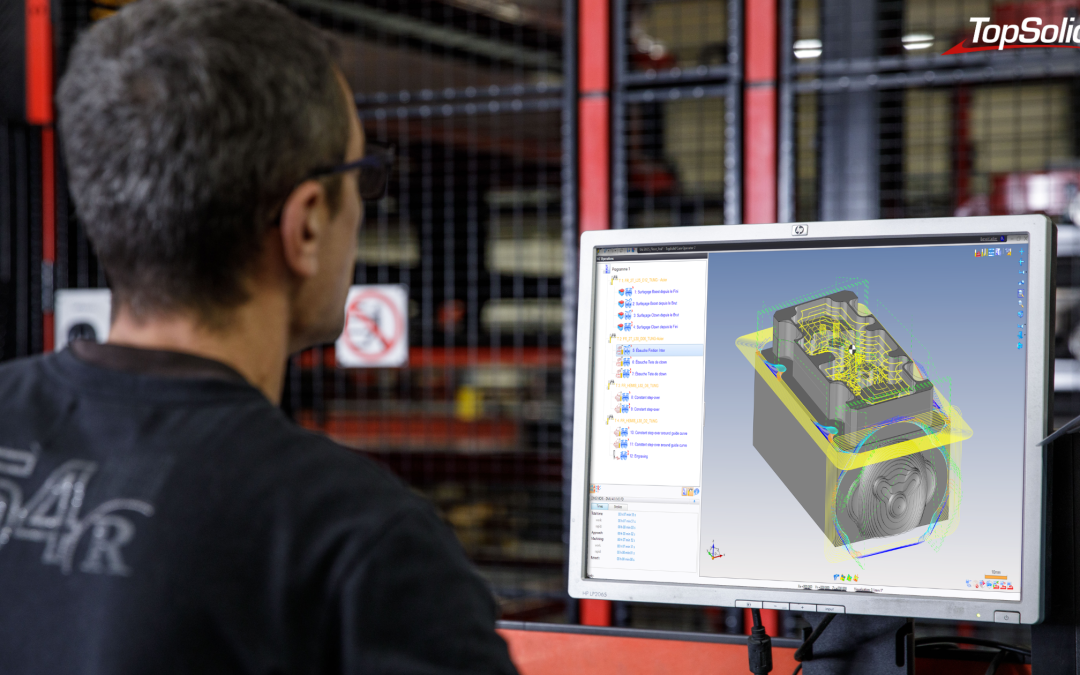
Photo credits: Laser cutting at our client Ferrier (39), a specialist in fine sheet metal work, Stéphane Couchet ©
Shorter lead times, smaller production runs, more complex geometries, and a shortage of technical talent: mechanical workshops are facing an unprecedented accumulation of pressures. In this context, CAD and CAM software are no longer merely design or programming tools. They have become central to the operational performance of industrial companies.
But the sheer number of digital innovations makes it difficult to prioritize. AI, digital twins, additive manufacturing, integrated ERP—where to start… and why? To help clarify things, we spoke with the experts at TOPSOLID. Benoît Lallier, a specialist in CAD/CAM environments, and Alexis Jacquillard, an ERP integration expert, share their take on the major trends for 2026—all without beating around the bush, using concrete examples.
Automation: Say Goodbye to Manual Programming
The first major trend is the automation of repetitive tasks, both in design and machining. AI in the strict sense isn’t yet being used for CAM (with the timeline for the most advanced machining functions being around 2027–2028), but structured and pragmatic automation, available today.
On the CAD front: building on what we’ve already achieved
How much time do we waste redesigning components that we’ve modeled dozens of times? Benoît Lallier identifies this as one of the first levers to activate: the libraries of parameterized components. “If I have a catalog of cylinders from a supplier like Festo and, as a design firm, I need to use them regularly, rather than redesigning the cylinder each time, I add it to my library. Or I import the 3D file directly from the supplier’s website.”
>>>> See also – From the Design Office to the Workshop: How Can We Break Down Silos to Improve Production?
TopSolid also includes smart components that automate the CAD operations related to their placement. “When you place a screw to assemble two parts, it automatically creates the drill hole in the first part and the tapped hole in the second. On a full project, this saves dozens of minutes.”
To take things a step further, you can save generic workflows and operational scripts that can be reapplied to new geometry with just a few clicks, or develop custom automations using TopSolid’s APIs—for companies willing to invest a little time in development.
CAM: From the Tool Library to Boost Milling
The same principle of capitalization applies to machining. The cutting tool libraries centralize the parameters for each tool, whether you build your own database or import them directly from suppliers (Kennametal, Sandvik, Fraisa, etc.) via the ISO 13399 standard. “Some customers assign a dedicated person to create these libraries. The effort is made up front, and then the entire shop benefits from it.”
Once these foundations are in place, the benefits accelerate. A CNC program can be automatically reapplied to new geometry: If the part changes, the machining path is recalculated without starting from scratch, using associative mode. You can also duplicate an entire machining sequence from one part to another that is very similar. “It’s really just copy and paste. All you have to do is copy the relevant faces.”
Among the still underutilized strategies, Benoît Lallier cites Boost Milling (trochoidal machining). “It’s like going from a BMW to a Formula 1 car. You can save up to 70% of roughing time compared to a standard strategy. The main obstacle is often a lack of knowledge: customers who aren’t familiar with the technology don’t buy the right cutting tools. Those who give it a try never go back.”
Automated Manufacturing Files round out the picture. Instead of relying on verbal communication between the programmer and the operator, TopSolid automatically generates a structured document that includes processing times per operation, tool references, tolerances, and 2D drawings. “The operator arrives with a detailed list. Every time he turns a page, he knows exactly what to do. It’s very instructive.”
An Often-Overlooked Issue: The Transfer of Know-How
When an FAO expert retires, their years of experience go with them—unless they have been documented in libraries and recorded procedures.
That’s exactly what TopSolid makes possible. “New employees can reuse what their colleagues have developed, without having to become super-experts themselves.”
>>>>See also – Training Tomorrow’s Technicians Using Today’s Tools
From Silo to Digital Thread: CAD/CAM/ERP Integration as a Competitive Advantage
This is the most transformative trend of 2026—and one of the most underrated. In many workshops, CAD, CAM, and ERP still operate as three parallel systems that don’t really communicate with one another. The consequences are well known, but are often accepted as inevitable.
The Pain of Compartmentalization
Alexis Jacquillard sums it up clearly: “The ERP is the nerve center of a company. That’s where everything flows through. When you have independent databases that don’t use the same reference framework, you don’t know if a reference in one system corresponds to the same reference in the other. We may all be talking, but we’re not speaking the same language.”
Visible costs (re-entry, file conversions, duplicates) are just the tip of the iceberg. Silent errors are often more serious: a discrepancy between the design department’s model and what is actually manufactured, material requirements calculated based on an obsolete bill of materials, or information lost when transferring data from one system to another.
In large organizations, the role of “data manager” is emerging to ensure the consistency of databases. This is a real problem, and it comes at a cost.
What Integration Actually Changes
When the supply chain is based on a single data model, the benefits are measurable within the first few weeks. “Take the case of a manufacturer of specialized machinery. The sales representative takes an order, and the draftsman designs the machine. The production planning department doesn’t have to re-enter everything—it benefits directly from the draftsman’s work. From the design department to the production planning department, we easily save 50% of the time. And there are no data entry errors.”
The connection between FAO and ERP opens up a particularly powerful angle of analysis: the comparison between theoretical time and actual time. The machining time calculated by the CAM system serves as the baseline. Once production begins, the ERP system records the actual time logged by the operator. “If the CAM system consistently estimates three minutes but we’re systematically taking four, we need to figure out why. That shows us where there’s waste in the production process that we could address.”
The integration now covers the entire TOPSOLID ecosystem: CAD, TopSolid’Cam (machining), TopSolid’Cut (sheet metal fabrication), ShopFloor (shop floor management), PartCosting, and Inspection. These modules are natively connected to the ERP system: ShopFloor transmits purchase requirements to the ERP system, which then issues purchase orders and reports the quantities received.
Next step: a stronger integration with Inspection, allowing users to open TopSolid’Inspection directly from the ERP system and scan their drawings; the dimensions to be measured will then be automatically imported into the ERP system.
The “best-of-breed” argument: a direct response
Some industry leaders argue that putting together the best specialized components on the market is superior to an integrated suite. Alexis Jacquillard responds bluntly: “Sure, they can choose the best tools on the market. But they won’t be as well integrated as what we’re doing today. The integration is robust because it’s an internal standard, not a custom development. When customers request updates, we incorporate them, and everyone benefits. With a best-of-breed approach, it’s often a costly custom solution that will need to be refinanced with every new request.”
Added to this is a fundamental argument that current hiring challenges make more relevant than ever: “In the past, executives would say to themselves, ‘It’s no big deal—I’ll just hire someone to re-enter the data.’ Today, hiring at every level is difficult. These interconnections are simply tools that make the process easier. We’ve reached the point where it’s hard to understand why a system isn’t automated.”
Change management: the real obstacle
The main barrier to adopting an integrated system is not technical. It is human. “Changing ERP systems is like changing the way a company is managed. It’s natural to be afraid of that. But an ERP system has a lifespan of between 7 and 10 years. The real question is what we stand to lose by sticking with an outdated system.”
TOPSOLID supports this transition with training, workshops, and skills transfer, with timeframes ranging from three months for a direct production launch to six months for full migrations. These periods also often provide an opportunity to revamping data and processes: “We’re taking advantage of this change to get everything in order. Clients are realizing that their database needed a major cleanup.”
>>>See also See also – Producing Quickly and Well: Industrial SMEs Face the Challenge of Customer Deadlines
Digital Twins and Simulation: From Buzzword to On-the-Shop-Floor Reality
The term “digital twin” has become so overused that it deserves to be grounded in reality. In a machine shop, a digital twin is, above all, a faithful 3D representation of the machine tool, its immediate surroundings, and the parts being machined on it, with sufficient accuracy to ensure that the remote simulation is reliable.
Benoît Lallier explains: “The goal is to have a virtual 3D model of your machine tool so you can perform the most realistic simulation possible. That way, when I’m programming from my desk—without being at the machine—I can already know what the machine is going to do.”
Integrated simulation makes it possible to verify in advance that there are no collisions, to determine the precise cycle times used for costing and sales, to analyze material flows for a given production run, and to balance workloads across machines before the parts go into production. “At some point, the customer thinks to himself: ‘Hey, instead of running this part through the small machine, it would be better to use the one next to it.’ It seems obvious, but in a just-in-time system, it’s not always that simple.”
There are two concrete benefits. In the workshop, the focus time plummets: The operator arrives with a manufacturing specification that lists exactly which tools are to be assembled, along with their dimensions and settings. Outside the workshop, the machine can continue to produce while the programmer prepares the next program—background programming.
Simulation also protects equipment. We’re talking about machines worth hundreds of thousands of euros, cutting tools whose breakage results in immediate costs, and parts made of expensive materials that would end up as scrap in the event of an error. “The goal is to avoid breaking anything. We can quickly detect whether a path will cause a collision before the actual machine is even touched.”
The Post-Processor as the Cornerstone
It is this feature that converts the simulated paths into machine code recognized by the CNC system, without the need for manual corrections. “This is a capability TOPSOLID has honed over more than 40 years. The idea is to deliver a turnkey solution: the customer clicks ‘Send Code’ and doesn’t have to do anything else.”
Additive Manufacturing, 5-Axis Machining, and Hybrid Processes
5-axis machining is becoming more widespread, and with it, the complexity of production runs and strategies. Hybrid machines, capable of alternating between additive and subtractive manufacturing, open up possibilities for geometries that were previously unattainable, while reducing the number of workpiece setups.
These developments do not call into question the previous principles: having a CAD/CAM solution capable of managing these advanced processes without any breaks in the digital chain remain essential for effective implementation. A 5-axis route generated in a tool that is not integrated with the ERP system does not allow you to leverage actual data or fine-tune the associated costs.
TOPSOLID has also integrated robotics in its environment, treating the robot like a conventional machine tool. “We didn’t want to make a distinction,” explains Benoît Lallier. “A customer who programs parts on their machining centers should be able to switch to the robot without having to relearn anything. Aside from the specific configuration settings related to the rotational axes, the logic is the same.”
Collaboration and Skill Development: People Remain at the Center
All of the trends mentioned above have one thing in common: they only achieve their full potential if the teams using them are trained, supported, and able to collectively build on their practices.
So the issue isn’t just about choosing the right tools, but about choosing a software provider capable of providing long-term support: during initial deployment, when upgrading to new versions, and whenever a new business need arises. Furthermore, the new generations of technicians trained on TopSolid represent a tangible asset for companies looking to hire. “The same logic applies everywhere. When they join a company, there’s no learning curve.”
How can we turn these trends into a competitive advantage?
The point isn’t to chase after every innovation at once. It’s to clarify its own challenges (timelines, quality, flexibility, cost control) and map out its current digital chain. Where are the gaps? Where are we losing time, information, and profit margins?
The levers often become apparent on their own: CAD/CAM integration if programming is a bottleneck; connection to the ERP system if re-entering data and variances between theoretical and actual costs are costly; and simulation if fine-tuning on the shop floor takes a long time and scrap is frequent. In each of these cases, The effectiveness of these tools depends directly on the consistency of the digital chain that connects them.
That is precisely where the strength of an integrated suite like TOPSOLID lies: not in being the best component in each segment, but in having all the components work together seamlessly within a common reference framework.
Would you like to assess which automation or integration solutions are best suited for your workshop? Contact our teams for a detailed discussion about your specific situation.