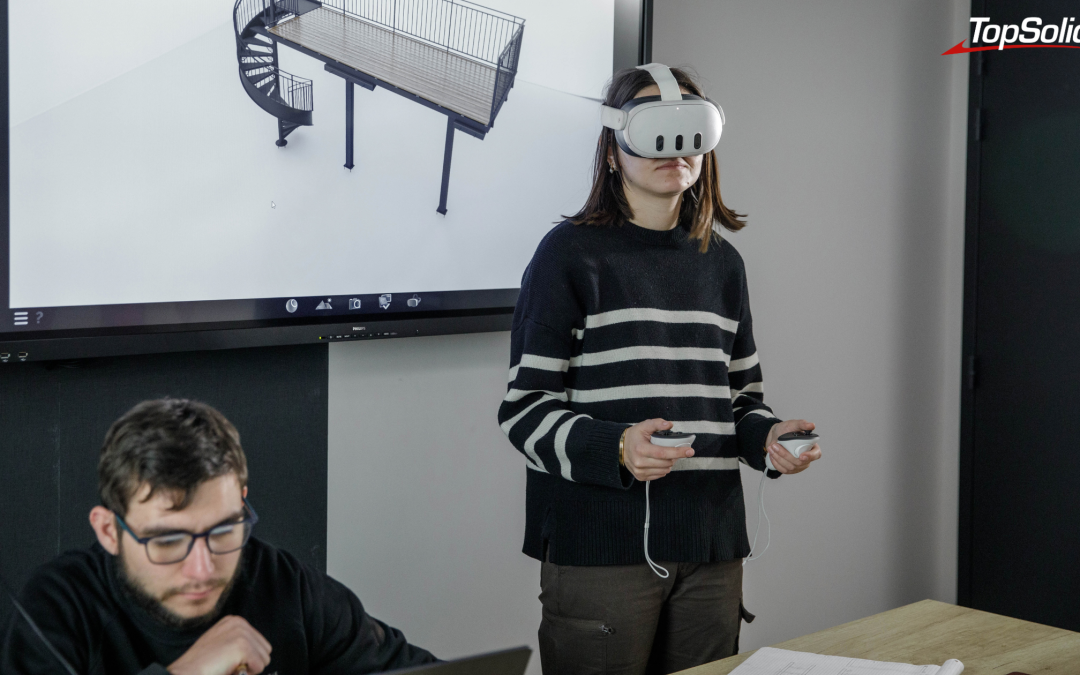
Photo credit: MSK (51), a metalwork specialist that designs and manufactures custom staircases, gates, and glass canopies, Stéphane Couchet ©
An industrial project doesn’t fall behind because the engineering department designs too slowly. It falls behind because the approval process drags on. One more meeting, a drawing that’s misinterpreted, a comment that arrives three weeks after the review. Immersive visualization doesn’t replace your design process—it tackles the link in the chain that’s slowing it down.
Why Validation Has Become the Bottleneck
Fewer points of contact, less time
A project involving a special-purpose machine, layout, or custom equipment is no longer approved by just two people. Around the table are representatives from the design office, process engineering, production, purchasing, sales, and the end customer. Each person reviews the same file but from a different perspective. Each approves the project based on different criteria.
The more stakeholders there are, the more validation becomes an exercise in alignment. And alignment comes down to one specific point: Does everyone see the same thing at the same time?
The 2D view requires an uneven amount of translation effort
An engineer can read a drawing without even thinking about it. A buyer, an operations manager, or an end customer, however, cannot. It’s not that they lack the skills—they’re simply not used to mentally reconstructing a solid from projected views.
As a result, the validation meeting begins with a twenty-minute explanation. The time available for decision-making is reduced accordingly. And, most importantly, some of the participants give their approval without being certain they’ve understood everything. That’s when the belated comments arise.
What a Late Submission Really Costs
A change requested during the design phase costs the engineering department time. The same change requested after the procurement process has begun—or after a physical prototype has been manufactured—results in wasted parts, delays from suppliers, and a cascade of schedule delays.
Physical Prototyping It remains the most reliable—and most expensive—approach. Each iteration ties up resources and extends the cycle. Reducing the number of prototypes needed has a direct impact on the overall project timeline.
So the issue isn’t about getting things approved more quickly in meetings. It’s about raising objections as early as possible, when they still only require a change to the model.
The Immersive Project Review: What’s Changing in the Room
Understanding Without 3D Expertise
Immersive visualization eliminates the translation step. The project appears exactly as it will be: materials, environment, proportions. A real-time rendering engine displays a realistic scene without any rendering time, and a library of materials, environments, and 3D objects allows you to transform a CAD file ready for use in a scene with just a few clicks.
A participant who can see no longer needs to imagine. He can therefore focus his attention on what he is there for: to judge.
Validate at a 1:1 scale what the screen leaves unresolved
Some issues can’t be decided on a screen. The accessibility of a maintenance panel, the clearance around a workstation, the height of a control, the perceived bulk of an assembly—these are matters of proportion, not measurements.
In virtual reality, the user stands in front of the full-scale model. They verify the proportions and shapes, thereby avoiding some of the costs and delays associated with physical prototyping.
By adding kinematic constraints, it interacts with objects just as it would in real life—a door opens, an arm moves, a hood pivots.
Make decisions during the meeting, not afterward
Slide mode allows you to create an interactive presentation that follows the design phases. Each participant interacts with the model, adding measurements and annotations. The comment is made in front of everyone, on the object in question, the moment it occurs to them.
That’s the key point. An objection raised during a meeting is addressed during that meeting. The same objection raised three days later, via email, starts the whole process over again.
>>> See also – Industrial Virtual Reality: How to Transform Your Production Line
Four Specific Challenges, Four Solutions
Immersion alone isn’t enough. What saves time is how the tool fits into the day-to-day operations of the engineering department. Four common pain points consistently arise.
1. The scene is outdated before the meeting
Classic: The immersive mockup was prepared ten days ago, and the design has evolved since then. Either we present a outdated version, or we redo all the staging work.
The TopSolid’Virtual Link feature updates the scene from TopSolid with a single click: modified CAD elements are replaced, while preserving visual settings and materials that have already been applied. The scene setup becomes a reusable asset, rather than an expense with each iteration.
2. The implementation is validated out of context
Equipment that has been validated in isolation may prove impossible to install. The actual conditions—a roof structure, an existing network, uneven ground—are almost never modeled in sufficient detail.
TopSolid’Virtual supports the import and direct reading of point clouds from 3D scans. The equipment is positioned and validated within the actual scanned environment, without the need for prior reconstruction. Layout validation is no longer a matter of guesswork.
3. The meeting turns into a technical demonstration
8When the presenter spends all their time fiddling with the tool, attention shifts to the tool. Presentation Mode intentionally limits functionality to the essentials: navigating the scene and switching slides, both in VR and on screen. The viewer focuses on the project, not the interface.
4. The project must be convincing beyond the technical review
The same mockup is often used twice: once for internal approval and once to convince a client. The Scenario Mode allows you to trigger actions and animations from the slides to build configurators or machine training materials. The customer interacts with the system, visualizes the results, and validates them on the actual part.
A building block of the cycle, not just another tool
The risk with immersive visualization is that it can become a silo: a dedicated workstation, a trained operator, and preparation required for each request. The benefit is then lost in the logistics.
Integrated into the TopSolid environment, TopSolid’Virtual imports files from TopSolid or the CAD software of your choice, and allows you to hold review meetings based on 3D files without requiring any 3D expertise. The immersive review becomes a step in the design cycle, not a project in and of itself.
For details on the features of the 3D visualization software, visit the TopSolid’Virtual product page.
Where to start?
There’s no need to switch over the entire design department all at once. The best place to start is a project where validation is already stalling.
- A project with a non-technical end client, where visualizing the design based on the drawings is a challenge.
- A project to install equipment in an existing environment, where the context is the main unknown factor.
- A project with a high number of iterations, where the back-and-forth validation process is already recognized as a cost.
Measure what matters: the number of validation meetings, the time between the initial review and the go-ahead for production, and the number of changes requested after launch. These three metrics will determine whether immersion yields real benefits for your organization.
Are your validation cycles getting longer? Our experts analyze your project review process and identify the stages where immersion yields measurable benefits.
Frequently Asked Questions
What is an immersive project review?
This is a validation meeting conducted using a digital model displayed in real-time 3D—either on a screen or in virtual reality—rather than using 2D drawings. Participants navigate the project, view it at actual scale, and add measurements and annotations during the session.
Do you have to be a 3D expert to participate?
No. TopSolid’Virtual is designed to allow employees without 3D expertise to participate in validation meetings. Presentation mode further limits user interactions to navigation and switching between slides.
Does immersive visualization replace physical prototyping?
It doesn’t eliminate them; it reduces the number of iterations. Validating proportions and shapes at a 1:1 scale makes it possible to rule out problems early on that would otherwise only become apparent with the first prototype.
Is it possible to approve a project remotely, across multiple locations?
Yes. Slide mode was designed to validate group projects during the various design phases, even when team members are located at multiple sites.
What CAD files can be used?
Files from TopSolid, as well as those from the CAD software of your choice. TopSolid’Virtual also supports the import of point clouds from 3D scans.