Predictive Maintenance: Revolutionizing Industrial Asset Management

Predictive Maintenance: Revolutionizing Industrial Asset Management

Maximizing the value and service life of equipment and infrastructure, improving operational performance, reducing costs and risks… These are just some of the many challenges involved in industrial asset management. To ensure an effective and optimized strategy, predictive maintenance relies on advanced technologies. The goal: to anticipate equipment failures. Let’s take a closer look.

Predictive Maintenance: An Intuitive Practice in Industry

What are the 5 types of maintenance in industry?

There are various types of industrial maintenance, which are carried out at different stages within industrial operations.

  • Corrective maintenance involves taking action after a breakdown to repair or replace the defective part or parts.
  • Preventive maintenance involves regular maintenance tasks performed according to a schedule or production cycles in order to prevent breakdowns.
  • Condition-based maintenance is based on monitoring the actual condition of equipment and is performed when certain thresholds are exceeded.
  • Predictive maintenance relies on advanced data analysis to anticipate breakdowns and take proactive measures to prevent them from occurring.
  • Proactive maintenance aims to identify and eliminate the root causes of failures. It also helps improve the long-term reliability of your equipment.

What is the difference between predictive and preventive maintenance?

Although often confused, predictive maintenance and preventive maintenance are two distinct aspects of industrial maintenance. The former relies on real-time data and advanced analytics to prevent breakdowns by anticipating the necessary actions. The latter, meanwhile, follows a fixed schedule to verify that assets are functioning properly and to take action as needed.

However, these two types of maintenance have one thing in common: they require a minimum of human and technical intervention—only when it is truly necessary.


The Benefits of Predictive Maintenance in Industry

Beyond its differences from preventive maintenance, predictive maintenance offers numerous advantages from a practical, technical, organizational, and even financial standpoint.

On the one hand, it allows for the precise targeting of maintenance interventions to maximize their effectiveness and thereby extend the service life of equipment. These operations are therefore performed only when absolutely necessary, based on the condition, performance, and degree of wear of the components. The result is a reduction in maintenance costs and downtime, as well as the optimization of production and the availability of human and material resources.

Furthermore, predictive maintenance enhances operational safety by preventing serious breakdowns. Such breakdowns can pose a real danger to workers, in addition to damaging infrastructure.


How Can Predictive Maintenance Be Implemented in Industry?

Predictive Maintenance in Principle

Predictive maintenance makes continuous data collection essential. To this end, equipment performance metrics (vibrations, temperature, pressure, etc.) are monitored and analyzed in real time. This continuous monitoring relies in particular on machine learning and artificial intelligence algorithms.

Once collected, this data must also be analyzed with a high degree of precision. In this context, it is crucial to incorporate the use of computer-aided maintenance management software (CMMS) into your processes.


The TopSolid Suite of CAD, CAM, PDM, and ERP Solutions

What are the main tools used in predictive maintenance?

Predictive maintenance relies on a number of tools and technologies for data collection. These include:

  • connected devices (IoT), such as sensors, which collect information from equipment in real time,
  • predictive algorithms (machine learning), which analyze data to detect anomalies and predict failures,
  • big data collection and analysis platforms, which manage and process large volumes of data to provide you with relevant and actionable insights for your maintenance strategy and operations,
  • CMMS software, such as the solutions offered by TOPSOLID, which facilitate the collection, management, and analysis of maintenance data.

With so many solutions available, ease of use and user experience are two key criteria for choosing the best solution. The goal is to have an advanced interface at your fingertips that provides your maintenance teams with clear visibility and the ability to make effective use of the data.

Key Steps for Successfully Implementing Predictive Maintenance

Once the tools for implementing predictive maintenance have been deployed, four steps are essential:

  1. Identifying anomalies (either internally or through algorithms) and implementing corrective actions;
  2. The development of predictive models (creation and training) based on historical data;
  3. Adjusting your maintenance processes by incorporating these predictive models;
  4. Performance monitoring and continuous adaptation.

This pattern repeats itself endlessly. It’s a virtuous cycle that ensures your predictive maintenance process is always up-to-date, efficient, and tailored to the realities of your environment at any given moment.

TopSolid’Erp for Effective Implementation of Predictive Maintenance

Recognized as the most advanced ERP solution for production management, quality control, and traceability, TopSolid’Erp includes a CMMS module. It was designed to make it easier to monitor the condition of your equipment, ensuring the optimal use of all your assets.

Among its key features are the scheduling of preventive maintenance and the reporting of corrective maintenance. This enhanced ability to plan ahead, combined with close monitoring, allows you to optimize the productivity of your production lines under all circumstances.

When properly implemented, predictive maintenance represents a major step forward for companies. Adopting this practice is tantamount to entering Industry 4.0—a data-driven industry that relies heavily on the capabilities of artificial intelligence.

By leveraging advanced technologies and integrated software—just like TOPSOLID does—you’ll be able to anticipate breakdowns and plan effective maintenance. This will help ensure an increasingly smooth and secure production process. Ready to get started? Contact us!

PDM: What Is It?

PDM: What Is It?

Today, PDM (Product Data Management) is considered an indispensable tool for industrial performance. Indeed, in the era of Industry 4.0, the challenges related to competitiveness and productivity require the ability to access accurate, up-to-date information at every stage of the product lifecycle.

What role does PDM software play within the supply chain? What challenges can this tool help solve? What are its contributions and benefits for CAD/CAM? Let’s shed some light on the subject!

PDM or Product Data Management: Definition

What is a PDM?

The PDM is the company’s Technical Data Management System. This refers to the capture, centralization, storage, and retrieval of all electronic CAD documents related to a product (design drawings, specifications and technical models, bills of materials, and related documents) throughout the entire digital chain. Before the advent of PDM systems, each company managed its files manually, which resulted in a considerable waste of time and an increased risk of errors.

From design to production, including the purchasing department, the primary purpose of the PDM is to streamline access to accurate, controlled, and always up-to-date product information for all business processes.

In an effort to address the significant challenges of quality and efficiency, Product Data Management helps resolve, among other things, three major types of issues related to the volume and constant evolution of data:

  • Traceability: By maintaining a history of document versions, it is possible to determine who did what, how, and when. This completely eliminates errors related to duplicates or incorrect versions.
  • Leveraging the company’s expertise—reviewing a previous design, resolving a bottleneck, costing a part—all of these are valuable data points that, when accessible and usable in real time, help significantly accelerate the design process. A well-structured PDM system facilitates the transfer of best practices and the sharing of knowledge among employees.
  • Improving performance—knowing how to adapt production quickly and effectively—is a significant competitive advantage for staying competitive in the face of constantly changing demand and technology. In this context, PDM provides unmistakable added value. Thanks to its integration with other industrial tools such as ERP and CAD/CAM software, PDM streamlines the transition between design and manufacturing.

Ultimately, the PDM enables faster access to data and makes it easier to use, secures business processes, and increases operational efficiency—the key drivers of quality and productivity!

What is the difference between PDM and PLM?

When it comes to product data management, two terms come up frequently: PDM and PLM (Product Lifecycle Management). While these solutions are complementary, they address different needs throughout the product lifecycle.

As mentioned above, PDM software is designed to centralize, organize, and secure technical data related to a product. It runs in the background and automates document management to prevent information loss.

PLM, on the other hand, is not limited to the management of technical files. It covers the entire product lifecycle, from design to manufacturing, including maintenance and recycling. In short, PLM encompasses PDM but goes far beyond it by integrating all stakeholders involved in product development and management.

If a company needs to organize its CAD data and improve collaboration, a PDM is sufficient. However, for comprehensive product lifecycle management—including the design, manufacturing, and operations phases—a PLM is more suitable.

How Can You Improve Technical Data Management with a PDM?

1. Centralize and organize technical data

One of the first steps toward improving technical data management is to implement a PDM system that will centralize all product information, including, among other things, CAD files, bills of materials, technical data sheets, and quality documents.

Benefits of PDM Centralization:

  • Avoid duplicates and inconsistencies in the files;
  • Facilitate access to up-to-date versions of documents;
  • Organize data for better traceability;
  • With a single database, every employee has access to the right information at the right time.

By consolidating all this data into a single repository, the PDM ensures that every employee has access to the correct information, without the risk of errors or duplication.

2. Ensure digital continuity and traceability

No more glitches! PDM software automates version control and keeps an accurate record of every change, ensuring seamless digital continuity.

Key PDM features for traceability:

  • Revision and change history management;
  • Workflow validation and monitoring;
  • Access control with customizable permissions.

It also allows you to track the history of changes and revert to a previous version if necessary, thereby significantly reducing human error.

3. Optimize data processing and monitoring

A PDM doesn’t just store files; it also provides advanced tools for processing technical data.

The benefits of a PDM:

  • Quick document search using metadata;
  • Automation of repetitive tasks (filing, archiving);
  • Integration with CAD, ERP, and PLM software for improved management.

How is PDM a powerful driver of productivity?

Simply by automating time-consuming tasks!

In a multi-site environment, this feature is essential. Take, for example, a change that needs to be made to a part. This change is immediately reflected across the relevant departments, which helps prevent manufacturing errors and delays.

With a document management system, the benefits are significant: reduced time spent searching for documents, elimination of duplicate data entry, and optimized approval processes.

PDM and CAD/CAM: What Are the Benefits of a Solution That Integrates PDM?

A PDM does not operate in isolation. It integrates with CAD, CAM, ERP, and MES software, enabling cross-functional management of product data. For example, when a designer modifies a 3D drawing in CAD software, the PDM instantly updates the associated bill of materials in the ERP system. The result: better coordination between departments, faster decision-making, and optimized production workflows.

The Importance of PDM in CAD/CAM

While CAD already benefits from the PDM’s capabilities in managing the technical complexity of projects—particularly in light of constantly changing demand and, consequently, the growing volume of data it generates—CAM has not yet fully adopted the tool. Yet the information centralized by the PDM pertains to the product’s definition and design as well as its manufacturing and use.

This means that the technical data management system is capable of processing all CAD/CAM information, which is accessible to users throughout the supply chain—from its initial creation through its evolution, distribution, and use.

Thus, a collaborative effort is established around the product, based on this secure, shared, intangible asset. Whether it involves best practices, methods, or processes, the PDM safeguards expertise and its evolution across all CAD/CAM disciplines. In this sense, it presents a real opportunity for operations to become more efficient and for the company to improve its performance.

The Benefits of an Integrated CAD/CAM/PDM Solution

The major advantage of an integrated CAD/CAM/PDM solution lies in its single workspace, where data creation, storage, modification, and distribution are all managed… a “detail” that makes all the difference! With TopSolid’Pdm, users benefit from a system that is fully integrated into their CAD/CAM environment, operating seamlessly without them having to worry about it. In fact, for machining professionals, for example, PDM offers significant qualitative benefits:

Significant time savings thanks to the digital document management system: from document creation to management, all information is digitized. No more manual processing! Since processes are driven by automated workflows, managing them is that much easier. The PDM thus offers optimal visibility and efficiency to users of the tool, regardless of whether they’re accessing, sharing, or distributing information!

100% reliable data security: digitizing information, maintaining a history of changes, and implementing authorization levels based on user profiles eliminate the risks associated with data loss or human error. Data integrity is therefore fully guaranteed over time!

Improved design and manufacturing processes: A clear advantage, real-time data updates ensure that users always have the right information at the right time. In this regard, PDM puts an end once and for all to the perpetual obsolescence of files and enables synergistic collaboration on a single project, with all stakeholders working from the same information. As a result, operations and the value chain are optimized.

Centralized information, data security, flexible workflows, and enhanced collaboration: the gains in quality and time savings inherent in an integrated CAD/CAM/PDM solution are benefits that industries need to address their challenges in productivity, continuous improvement, and the preservation of their expertise. This is precisely why the best CAD/CAM software on the market includes a product data management system… with TopSolid solutions topping the list!

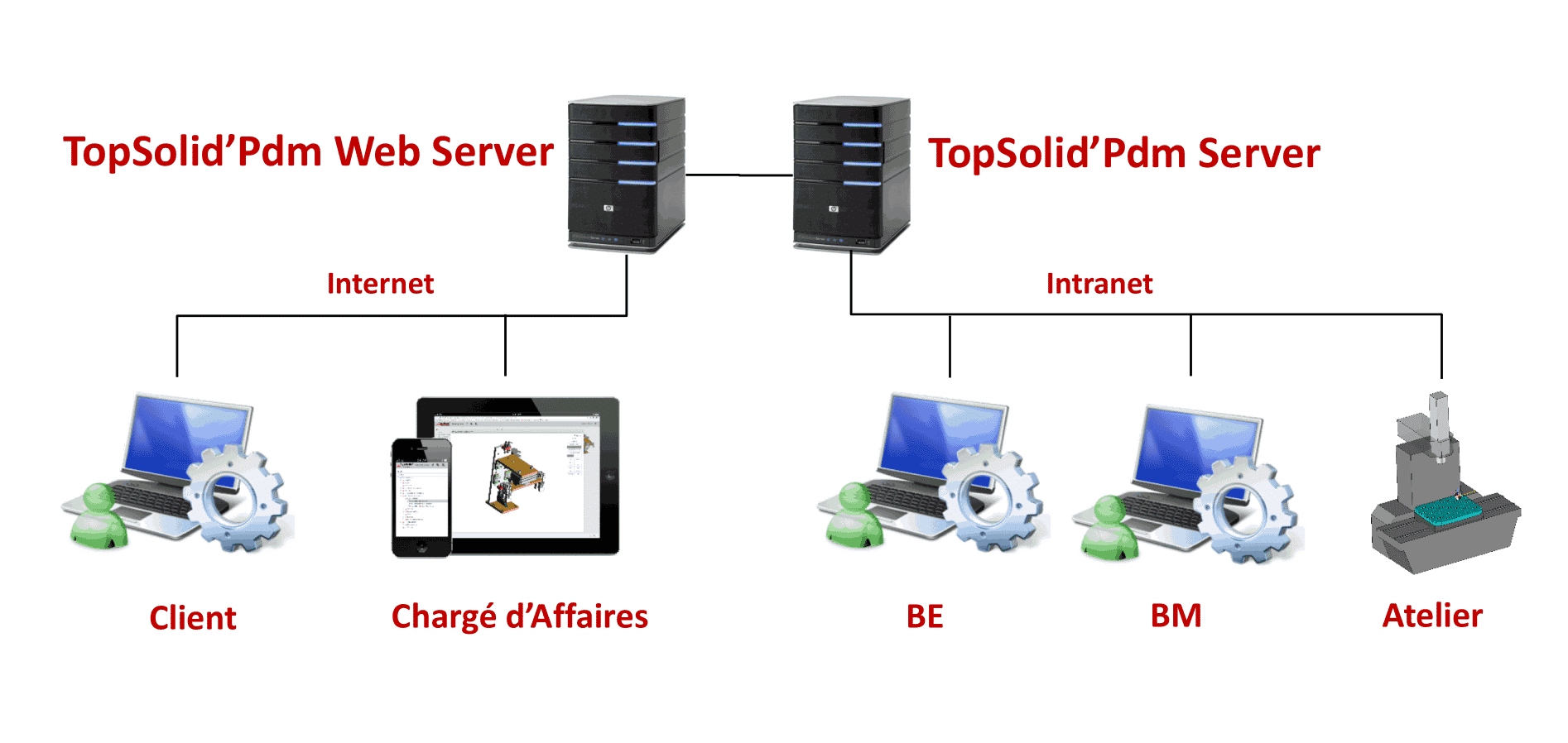
Diagram of How TopSolid PDM Servers Work

The TopSolid Suite of CAD, CAM, PDM, and ERP Solutions
The Integrated PDM at TOPSOLID SAS

What sets the TopSolid CAD/CAM/ERP/PDM software suites apart is that they offer an all-in-one solution that combines CAD/CAM programming (machine simulation with ISO code management, machining scenarios under optimal reliability conditions, raw and machined parts, etc.) and data management—all integrated into the user’s work environment.

This unique and powerful database not only brings together all product information (customer parts, tooling, shop floor records, tool databases, ISO codes, etc.) in one place, but also manages the relationships between data across the entire digital chain in a transparent and automated manner.

As such, all methods, know-how, design parameters, and results essential to the company are managed by the PDM. This applies even to supporting documents such as orders, certificates, administrative processes, and approvals. Furthermore, the tool tracks every type of revision—regardless of its significance—across all document types, thereby ensuring complete data security and the long-term preservation of expertise.

This all-in-one structure makes the solution easy to learn and intuitive to use. Searches are performed using metadata or use cases, and the features are tailored to the user’s needs, whether they are working alone, in a team in local mode, or in a multisite environment.

The bonus: The TopSolid’Web Explorer viewer ensures access to data from any device, and the PDM’s multisite feature allows information to be shared across various design and production sites, no matter where they are located.


Improved collaboration, streamlined processes, elimination of errors, and knowledge capitalization: choosing TOPSOLID SAS’s integrated CAD/CAM/PDM solution means committing to true operational flexibility, constant security, and an undeniable increase in productivity—all benefits that provide the best solutions to the performance challenges of Industry 4.0!

Document Management Software: Everything You Need to Know

Document Management Software: Everything You Need to Know

A well-organized library, where every document is in its place, accessible in an instant, with no risk of loss or damage? That’s exactly what EDM (Electronic Document Management) software provides—an essential tool for document management in businesses.

No more rummaging through paper files or wasting time trying to find a misplaced document. Thanks to digitization, all data is stored, organized, and secured in a centralized digital system. Technical drawings, invoices, contracts, HR documents… everything is structured and accessible according to defined access rights. Let’s take a closer look at how to choose the best solution for your business and take full advantage of electronic document management.

What is EDM?

Electronic document management refers to a computer-based document management system that enables companies to digitize, organize, store, share, and secure their digital files.

This type of solution replaces traditional paper-based document management by offering advanced features such as automatic indexing, quick search, version control, and access rights management. Electronic document management software streamlines document workflows and improves productivity, since all essential information is available on a single platform, accessible to employees based on their permissions.

How can you optimize document management?

Optimizing document management relies on several key factors: automating processes, structuring workflows, and centralizing document management. Here are the key steps to achieving this.

1. Centralize document workflow management

One of the main challenges in document management is the fragmentation of files across different departments, platforms, and media (emails, local servers, the cloud, paper, etc.). There are several steps that can help mitigate this risk:

  • Implementing document management software: This is clearly the first step a company should take. It requires all employees to consolidate every document into a single, secure, and accessible location.
  • Establish clear storage policies and automatically delete unused versions to avoid duplicates and obsolete files.
  • Prioritize secure cloud storage.
  • Set up a file organization structure with relevant categories and tags to quickly find the files you need.

Thanks to this centralization, teams can access documents more easily and avoid information loss caused by fragmented management.

2. Automate document-related processes

Everyone is talking about task automation. Applying it to document management processes is therefore a no-brainer… and here’s why it’s particularly useful:

  • Automatically index documents by extracting metadata (dates, customers, invoice numbers, etc.) using artificial intelligence and OCR (optical character recognition) tools.
  • Generate automated approval workflows: for example, an invoice can be automatically sent to a manager for approval without requiring manual intervention.
  • Archive documents according to predefined rules: A document can be moved to a specific folder after a given period or deleted once its legal retention period has expired.
  • Send notifications and alerts to remind users of important deadlines (contract renewals, document updates, pending approvals, etc.).

3. Organize document workflows

When we talk about workflow, we’re talking about documents that flow smoothly. To achieve this, it’s important to:

  • Define approval workflows for documents that require multiple approvals (invoices, contracts, quotes, etc.).
  • Assign specific roles and permissions to each user based on their activities.
  • Track all changes made to the documents.
  • Facilitate collaboration: Add comments, share versions, and sign electronically.

What are the benefits of EDM?

An EDM system means less paperwork and greater efficiency. Here are its key benefits.

Save time with quick, organized access to documents

In many companies, finding a document can be a real headache. Between paper files, files stored on various servers, and emails, it can be a huge waste of time.

With a well-organized document management system, documents are:

  • Automatically organized using metadata and a logical tree structure.
  • Easily accessible via an advanced search by keyword, author, date, or file type.
  • Accessible remotely from any connected device, eliminating the need for constant back-and-forth trips between offices or departments.

Reduction in printing and physical storage costs

Paper-based archiving represents a significant cost for businesses: printing, binders, storage space, and records management. In addition, paper is vulnerable to loss, deterioration, or accidental destruction (fire, water damage).

Thanks to the EDM system:

  • Printouts are becoming unnecessary.
  • Physical archiving costs are reduced.
  • Less office equipment (printers, copiers, paper) = lower expenses.
  • Optimized space management: Offices are no longer cluttered with filing cabinets, and the company can save money on renting or purchasing storage space.

Better collaboration between teams thanks to simplified document sharing

Collaborative work is a major challenge for modern businesses, particularly with the widespread adoption of remote work and geographically dispersed teams.

With an EDM system:

  • All employees can access documents in real time, without having to wait for a file to be sent by email or uploaded to a server.
  • Document versions are synchronized in real time.
  • Automated workflows can be set up.
  • Built-in annotations and comments facilitate better collaboration among team members.


The TopSolid Suite of CAD, CAM, and ERP Solutions

What are the essential features of an EDM software system?

When choosing electronic document management software, it is important to carefully review the features that will meet the company’s specific needs. Here are the key features to consider before making a decision:

Access Rights Management and Security

Good document management software must ensure data confidentiality and protection. To do so, it must allow users to:

  • Define access levels based on user roles (view, edit, delete).
  • Manage custom access rights (especially for sensitive documents).
  • Implement advanced security protocols (encryption, two-factor authentication, GDPR compliance).

Indexing and Smart Search

Indexing allows documents to be automatically classified:

  • Automatic indexing based on file content.
  • An advanced search using keywords, metadata, or specific criteria.
  • Optical character recognition (OCR) to retrieve information from scanned documents.

Automation of Document Workflows

This feature should allow you to:

  • The creation of validation workflows for the automatic validation of documents (invoices, contracts, quotes, etc.).
  • Automatic assignment of tasks to the relevant employees.
  • Notifications and reminders to prevent oversights in document processing.

Document Archiving and Lifecycle Management

The archiving feature must include:

  • Rules for retention and automatic deletion based on the legally required retention period for documents.
  • Complete traceability of changes made to and access to each document.
  • The ability to organize documents by category, date, and version.

Integration with Other Software

Good document management software should integrate with the tools already in use at the company, such as:

  • ERP and CRM systems for seamless data synchronization.
  • Office software (Microsoft Office, Google Workspace) for editing files without downloading them.
  • Cloud solutions for secure multi-device access.

Ease of Use and Ergonomics

The adoption of an EDM system also depends on how easy it is to use. It is important that it offer:

  • An intuitive interface that employees can use without extensive training.
  • Clear document organization with customizable folders and filters.
  • A mobile version for accessing documents on the go.

Legal Compliance and Regulatory Standards

Document management software must comply with legal requirements for document management, including:

  • GDPR compliance to protect personal data.
  • NF Z42-013 certification to ensure the legal validity of digital documents.
  • Advanced electronic signature management for validating contracts online.

Implementing an EDM system means organizing and securing document management while making day-to-day operations easier. TopSolid’Erp goes a step further by integrating secure storage, precise access control, and advanced revision and distribution management. Combined with a powerful search engine and document links across all processes (sales, purchasing, production, quality, etc.), it offers seamless management that meets business requirements.

Find out how TopSolid’Erp optimizes document management—and much more! Want to talk about it?